Execution Order
This page explains the execution order of Global Rewrite Rules, page rules, and page rule actions for HTTP and HTTPS requests. It also explains which setting takes precedence when several rules or settings affect the same item.
Use it to understand how features interact. For example, it shows whether WAF inspects a URI rewritten by a page rule and whether a response header action applies to a cached response.
This page applies to OpenResty Edge 26.9.1-1 and later 26.9 releases. It covers HTTP and HTTPS applications only.
Version Labels
The Version column shows the first OpenResty Edge release that includes an item:
- An empty cell means the item was available before OpenResty Edge
22.12.1-1. - A version such as
24.9.1-1is the first release that includes the item. - Coming soon means the item is not in a released version yet.
Overview
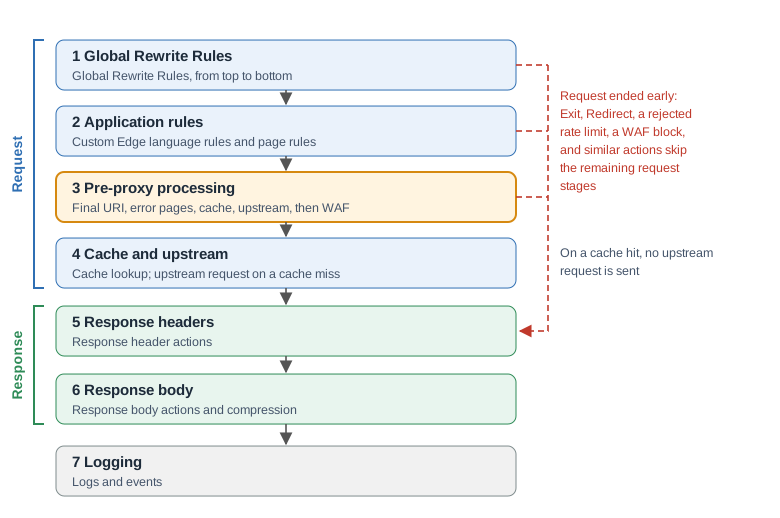
After the node identifies the application, it handles the request in these stages:
- Global Rewrite Rules: Run for every application in the partition.
- Application rules: The custom Edge language rules and the page rules of the application run.
- Pre-proxy processing: Apply the final URI, enable error pages, decide caching and the upstream, then run WAF.
- Cache and upstream: Look up the cache. On a miss, send the request to the upstream.
- Response headers: Run response header actions.
- Response body: Run response body actions and compression.
- Logging: Write logs and send events.
Some actions can end a request before the cache and upstream stage, including Exit the current request and return status code, a rejected rate limit, and a WAF block. The node skips the remaining request processing and generates a response. That response still passes through the response headers, response body, and logging stages. See Requests Rejected Before WAF and Responses Sent Before WAF for the differences.
Rule Order
When a rule matches, its parts run in this order:
- Run the Action list from top to bottom. A Global Custom Action runs according to its position in the list.
- WAF: Register a WAF check. The node runs the check during pre-proxy processing.
- Content: Send the configured content and stop processing later page rules. See Responses Sent Before WAF.
- Proxy: Record the upstream configuration. The node resolves the upstream during pre-proxy processing.
- Cache: Record the cache settings. The node applies them during pre-proxy processing.
- Skip any subsequent page rules when this rule matches: Stop processing later page rules.
When Actions Take Effect
- At the rule: The action runs as soon as its rule matches. Later rules see the result.
- Pre-proxy processing or Response headers: The action records a setting, which the node applies during the named stage.
The Ends the request column shows whether an action ends the request in its rule. Always means that it always ends the request. A condition means that it does so only when the condition is met. An empty cell means that the action does not end the request.
| Action | Takes effect | Ends the request | Version |
|---|---|---|---|
| Set URI | At the rule | ||
| Add URI prefix | At the rule | ||
| Remove URI prefix | At the rule | ||
| Remove URI segment | At the rule | ||
| Set URI argument | At the rule | ||
| Add URI argument | At the rule | ||
| Remove URI argument | At the rule | ||
| Set request header | At the rule | ||
| Add request header | At the rule | ||
| Remove request header | At the rule | ||
| Set variable | At the rule | ||
| Log error message | At the rule | ||
| Delay | At the rule | ||
| Using Edgelang | At the rule | ||
| Run Lua module | At the rule | ||
| Mirror Request | At the rule | ||
| Record WAF logs | At the rule | 23.3.1-1 | |
| Set uploaded file arguments | At the rule | 23.3.1-1 | |
| Enable S3 authentication | At the rule | 25.9.1-1 | |
| Limit request rate | At the rule | When it rejects the request | |
| Limit request count | At the rule | When it rejects the request | |
| Limit request concurrency | At the rule | When it rejects the request | 24.9.2-1 |
| Block Request | At the rule | When it rejects the request | |
| Block IP List | At the rule | When the client IP is in the list | 26.3.2-1 |
| Enable Basic Authentication | At the rule | When authentication fails | |
| Enable OpenIDC Authentication | At the rule | When it redirects the client to the identity provider | |
| OAuth2 JWT validate | At the rule | When validation fails | |
| OAuth2 introspection validate | At the rule | When validation fails | |
| Enable hCaptcha | At the rule | When the client has not passed the challenge | |
| Enable OpenResty Edge Built-in Captcha | At the rule | When the client has not passed the challenge | |
| Enable Private Access Token | At the rule | When the client has not passed the challenge | 26.9.1-1 |
| Enable Circuit Breaker | At the rule | When the circuit is open | |
| Enable CSRF token | At the rule | When the token check fails | 23.3.1-1 |
| Enable SSL client verify | At the rule | When the client certificate check fails | |
| Block IP | At the rule | Always | 26.3.2-1 |
| Exit the current request and return status code | At the rule | Always | |
| Redirect | At the rule | Always | |
| Close Connection | At the rule | Always | 24.9.1-1 |
| Output response body | At the rule | Always | |
| Return static file | At the rule | Always | |
| Set maximum request body size | Pre-proxy processing | ||
| Set proxy URI | Pre-proxy processing | ||
| Rewrite proxy URI prefix | Pre-proxy processing | ||
| Set proxy host | Pre-proxy processing | ||
| Custom error page | Pre-proxy processing | ||
| Set proxy header | Cache and upstream | ||
| Append proxy header value | Cache and upstream | ||
| Pass request headers | Cache and upstream | 25.12.1-1 | |
| Pass request body | Cache and upstream | 25.12.1-1 | |
| Use Downstream Server Address as Upstream Source Address | Cache and upstream | 22.12.1-1 | |
| Enable WebSocket | Cache and upstream | ||
| Enable proxy cache revalidate | Cache and upstream | ||
| Use stale proxy cache | Cache and upstream | ||
| Proxy cache bypass | Cache and upstream | 26.6.14-1 | |
| Proxy no cache | Cache and upstream | 26.6.14-1 | |
| Disable request buffering | Cache and upstream | ||
| Disable proxy response buffering | Cache and upstream | 23.12.1-1 | |
| Intercept Upstream Errors | Cache and upstream | ||
| Follow HTTP redirect | Cache and upstream | 26.9.2-1 | |
| Enable HTTP slice | Cache and upstream | Coming soon | |
| Set response header | Response headers | ||
| Add response header | Response headers | ||
| Remove response header | Response headers | ||
| Set response cookie | Response headers | ||
| Set response cookie SameSite | Response headers | 23.3.1-1 | |
| Set expiration time | Response headers | ||
| Apply standard MIME types | Response headers | ||
| Response body filter | Response body | 23.3.1-1 | |
| Capture response body | Response body | ||
| Enable gateway Gzip | Response body | ||
| Enable gateway Brotli | Response body | ||
| Enable gateway Zstandard | Response body | 25.6.1-1 | |
| Set Gzip Types | Response body | ||
| Set Brotli Types | Response body | ||
| Set Zstandard Types | Response body | 25.6.1-1 | |
| Limit response data rate | Response body | ||
| Enable OpenTelemetry Trace | Logging | 24.9.2-1 | |
| Set OpenTelemetry Span Name | Logging | 24.9.2-1 | |
| Enable limit traffic event | Logging | ||
| Enable circuit breaker event | Logging | ||
| Disable Access Log | Logging |
Set URI and the other URI actions immediately change the URI seen by later rules. The node applies the final URI during pre-proxy processing.
Enable CSRF token checks the token at the rule and injects tokens during the response body stage.
Mirror Request sends a copy of the request at the rule and waits for it to finish. With Asynchronous Request Mirroring, the node sends the copy during the cache and upstream stage without waiting. It does not send a copy if the request ends earlier.
The OpenTelemetry actions mark the request for tracing. The node exports the span when the request ends.
These reject options of the rate limit actions and Block Request were added after 22.12.1-1:
- JavaScript Challenge and Redirect Validate (
23.3.1-1) - Return Page Template (
24.3.1-1) - Mark as Rejected (
24.9.7-1) - Block IP (
26.3.2-1) - Private Access Token (
26.9.1-1) - No Delay was added in
24.9.1-1. - Log Delay was added in
26.9.20-1. - Coming soon: Log Only only records the request in the DoS log in the logging stage and never delays or rejects it.
Requests Rejected Before WAF
The request ends at the rule and skips the pre-proxy processing stage in these cases:
- A rate limit action or Block Request rejects the request.
- Block IP runs, or Block IP List matches the client. The node closes the connection and writes no access log.
- Enable Basic Authentication, OAuth2 JWT validate, or OAuth2 introspection validate fails.
- Enable hCaptcha, Enable OpenResty Edge Built-in Captcha, or Enable Private Access Token challenges a client that has not passed the challenge.
- Enable OpenIDC Authentication redirects the client to the identity provider.
- An Enable Circuit Breaker action finds the circuit open.
Responses Sent Before WAF
Output response body, Return static file, and the Content section send the response before WAF runs.
Priority for Conflicts and Shared Items
Between Rules
In this table, “first” and “last” refer to execution order. Global Rewrite Rules run first. Page rules then run in this order: Always-Top rules, normal rules, and Always-Bottom rules. Each group runs from top to bottom.
Within a rule, the Action list runs first, followed by the WAF, Content, Proxy, and Cache sections. A later setting overrides an earlier one.
| Item | Which one takes effect |
|---|---|
| Proxy to upstream in the Proxy section | The matching rule that runs last |
| Cache key components and the other options of the Cache section | The matching rule that runs last. For Caching by Default, see the next two rows. |
| Caching by Default for status 200 | The matching rule that runs last |
| Caching by Default for other status codes | In released versions, the first matching rule. Coming soon: the matching rule that runs last, the same as for status 200. |
| Set proxy URI and Rewrite proxy URI prefix | The action that runs last |
| Set proxy host | The action that runs last |
| Set maximum request body size | The action that runs last |
| Custom error page for the same status code | The action that runs last |
| Set expiration time and Browser Cache | The one that runs last. In the same rule, Browser Cache runs after the Action list and wins. |
| Set request header, Set proxy header, or Set URI argument for the same name | The action that runs last. Add request header and Add URI argument add another value instead. |
| Set request header and Set proxy header for the same header | The upstream receives the Set proxy header value. Later rule conditions and WAF see the Set request header value. |
| Set response header, Add response header, and Remove response header for the same name | Applied in the order they ran. Set response header also replaces a header of the same name from the upstream. |
Set expiration time or Browser Cache, and a response header action for Cache-Control or Expires | Set expiration time or Browser Cache, which the node applies after the response header actions |
| WAF sections of several rules | Every registered check runs, in rule order. The first check that blocks the request ends it. |
| Rate limit actions and Block Request in several rules | Every matching action runs at its rule and counts on its own. The first one that rejects the request ends it. |
Between Page Rules and Settings
Some items can also be set in the application Settings and in Global Config > General. For a request that a page rule matches, the page rule action takes effect. An application setting takes effect over the global setting unless it is set to Using the Global configuration.
| Item | Priority, from highest to lowest |
|---|---|
| Request body size limit | Set maximum request body size action, Apply custom max request body size in the application Settings, Maximum request body size in Global Config |
| Gzip | Enable gateway Gzip and Set Gzip Types actions, Gzip compression of responses in the application Settings, Gzip in Global Config |
| Brotli | Enable gateway Brotli and Set Brotli Types actions, Brotli compression of responses in the application Settings, Brotli in Global Config |
| Zstandard | Enable gateway Zstandard and Set Zstandard Types actions, Zstandard compression of responses in the application Settings, Zstandard in Global Config |
| Cache revalidation | Enable proxy cache revalidate action, Proxy cache revalidate in the application Settings, Proxy cache revalidate in Global Config |
| Stale cache | Use stale proxy cache action, Apply custom stale proxy cache in the application Settings, Use stale proxy cache in Global Config |
| Upstream error interception | Intercept Upstream Errors action, Intercept the origin site’s error pages in Global Config. Follow HTTP redirect also turns interception on. |
| Error page for a status code | Custom error page action, Enable OpenResty Edge error pages in Global Config |
The application settings are applied after the Global Rewrite Rules. An application setting that is not set to Using the Global configuration therefore overrides the same action in a Global Rewrite Rule. The request body size limit from the application Settings or Global Config also overrides a Set maximum request body size action in a Global Rewrite Rule.
WAF
When a page rule matches, its WAF section registers a WAF check. The node runs all registered checks during pre-proxy processing, after all page rules and the custom Edge language rules at the end of the page. For configuration instructions, see Enable WAF for an Application.
As a result:
- WAF inspects the request as the page rules left it, including a rewritten URI, changed request headers, and the request body.
- Actions in both earlier and later rules run before WAF. A rate limit, captcha, or authentication check can end the request before WAF runs. Actions such as Exit the current request and return status code allow WAF to run before the request ends.
- Output response body, Return static file, and the Content section send the response before WAF runs.
- WAF Whitelist conditions are checked before the page rules run, against the original request. The matching entries apply to every WAF check.
- WAF runs before the cache lookup, so it also inspects requests that the cache answers.
- WAF currently inspects requests only and does not support inspecting responses yet. With the Log only block action, Capture Response Body (
23.6.1-1) adds part of the response body to the WAF log. - A blocked request still passes through the response headers, response body, and logging stages, so response header actions and logging apply to the block response.
These WAF options were added after 22.12.1-1: the Close connection, Redirect Validate, and JavaScript Challenge block actions (23.3.1-1), Paranoia Level (26.6.1-1), and the Private Access Token and Custom Action block actions (26.9.1-1).