HTTP Slicing
HTTP slicing splits a large response into fixed-size byte-range subrequests and caches the slices separately. It is intended for large files, videos, and other static objects that support byte ranges.
This feature was first introduced in OpenResty Edge 26.12.1-1.
Configure the action
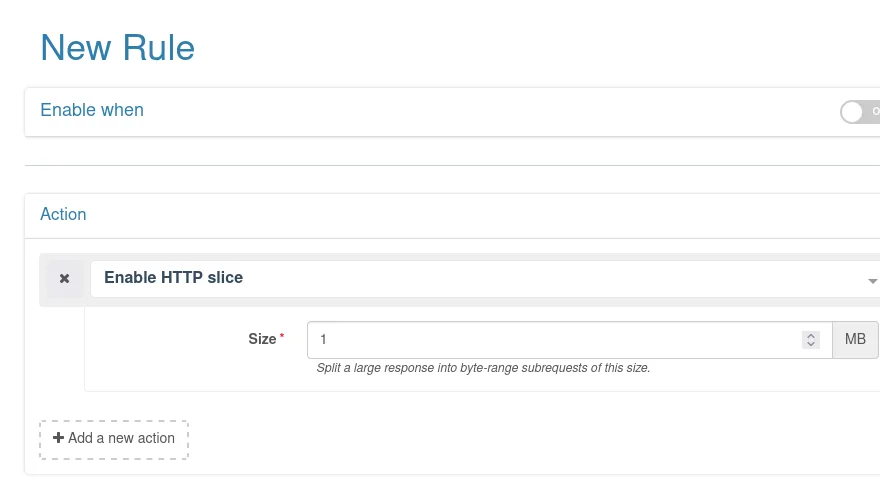
- Add Enable HTTP Slice to an HTTP application page rule, a global rewrite rule, or a global custom action.
- Set the slice size. Edge Admin displays the value in MB, with a minimum of 1 MB.
- Make sure proxy caching is enabled for the same request, then save and publish the configuration.
Slicing applies only to cached requests. The gateway uses Range to fetch each
slice from the origin while the client still receives one continuous response.
For reliable slicing, the origin must support byte-range requests correctly and
return 200 or 206.
Choose a slice size
A smaller slice reduces the amount fetched for an initial read, but increases origin requests and cache keys. A larger slice reduces the request count, but can increase time to first byte and overfetching. Test with representative objects, client access patterns, and origin capacity. The console warns about values of 128 MB or more.
Limitations and troubleshooting
- Do not set, add, or modify the upstream
Rangerequest header on the same request. - Rules that require a complete response body can conflict with slicing and a
client’s own range request, resulting in
500. Remove the conflicting Range handling or disable slicing. - Each slice can be retried independently, which can multiply origin requests while the origin is unstable.
- Changing the slice size creates different cache keys. Evaluate the cache and origin traffic impact before publishing the change.